
Quick summary: Time-tracking software records work activity so employees and teams can manage hours, improve focus, bill accurately, and make better decisions. When chosen and used fairly, it benefits individual contributors, freelancers, and teams alike.
What is time-tracking software?
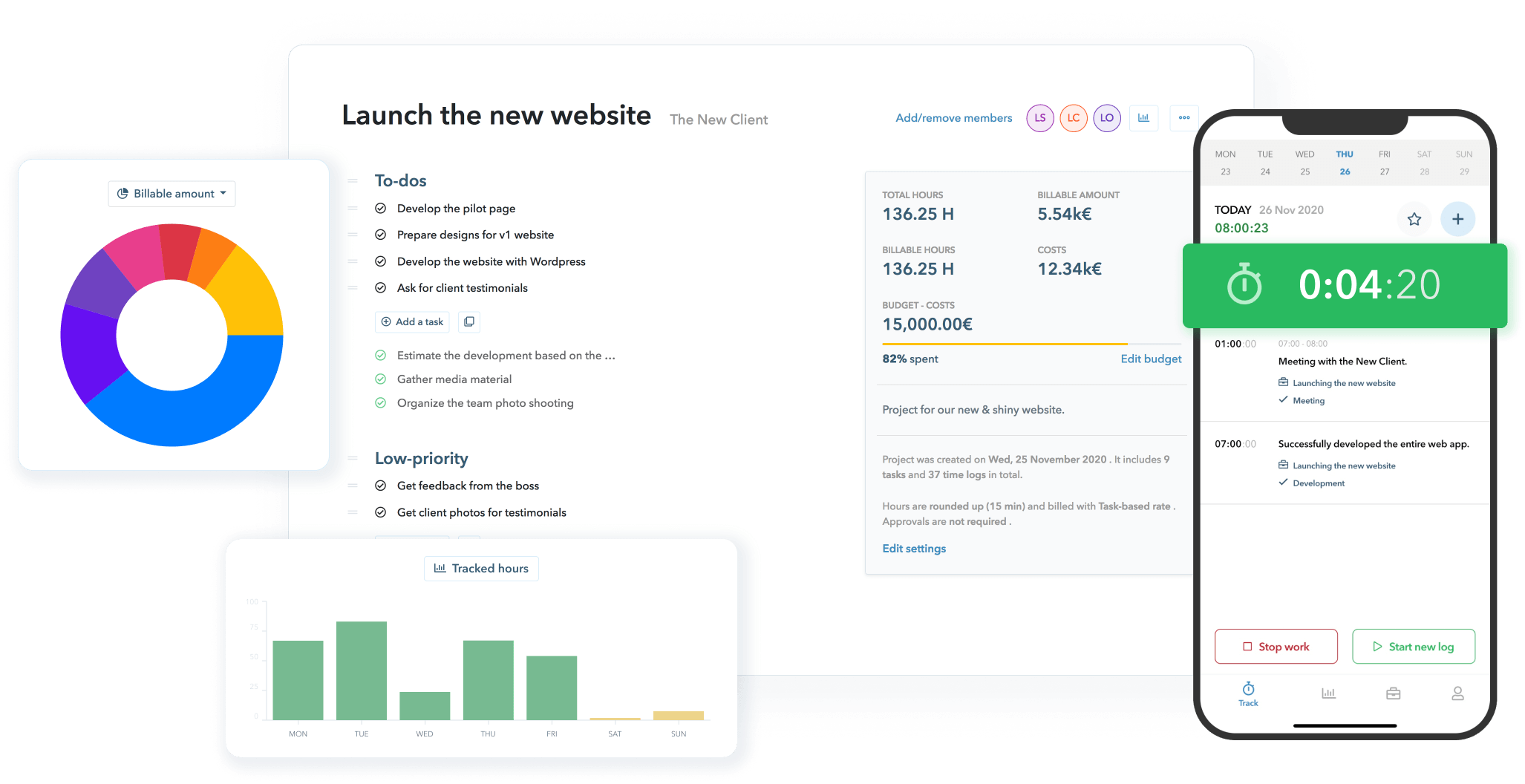
Time-tracking software captures how long you spend on tasks, projects, or clients. Tools range from simple stopwatch-style timers to apps that automatically log activity, generate timesheets, integrate with billing or payroll, and produce reports managers and employees can use to improve workflows.
Why it’s useful for any employee
Different roles get different value from time tracking. Here are the most common, practical benefits that apply across jobs and industries.
1. Better personal time management
Seeing exactly where your time goes makes it easier to identify time sinks and replicate productive routines. When you map daily activities to outcomes, you can prioritize higher-impact work and reduce low-value busywork.
2. Increased accountability — without micromanagement
Transparent time records create a shared fact base. When used responsibly, they reduce guesswork about who worked on what and when, and they discourage accidental overwork or underreporting without requiring constant oversight.
3. Accurate billing and pay
For contractors and hourly workers, precise logs protect earnings and reduce disputes with clients. For salaried employees, integrated timesheets help payroll and finance teams reconcile overtime and project costs.
4. Focus and productivity
Timers and task lists help employees work in concentrated blocks and limit context switching. Reviewing activity reports often reveals opportunities to batch similar tasks, delegate, or eliminate unnecessary steps.
5. Healthier work–life balance
Tracking makes it easier to spot chronic overwork and set boundaries. If your logs show regular late-night hours, you and your manager can take steps to redistribute workload or adjust expectations.
6. Professional growth
Time data highlights skills or tasks that consume large amounts of time. That information can guide training, delegation, or process changes that free time for higher-value responsibilities.
Key features employees should look for
Not all time-tracking tools are the same. Choose software that matches how you work and respects privacy.
- Easy start/stop timers — quick to use for short tasks and interruptions.
- Manual editing of entries — lets you correct mistakes and add context.
- Project and client tagging — essential for freelancers and consultants.
- Reporting and export — readable summaries for reviews, billing, and personal reflection.
- Integrations — connects with calendars, project management, payroll, and accounting systems.
- Privacy controls — clear policies about screenshots, keystroke logging, and data retention.
How to get value without creating distrust
Adoption succeeds when employees understand purpose and protections. Use these practical rules:
- Define purpose: Be explicit if the tool is for invoicing, productivity analysis, or attendance.
- Limit scope: Collect only the data needed for the stated purpose. Avoid overbroad monitoring.
- Allow corrections: Employees should add context, correct entries, and flag errors.
- Share insights: Use reports to help employees improve, not just to police them.
- Protect privacy: Keep personal information out of logs and set reasonable retention policies.
Practical tips for employees
- Start and stop timers conscientiously — treat them as part of your workflow, not an afterthought.
- Group similar tasks into blocks (e.g., email, meetings, focused work) to reduce context switching.
- Review your weekly report and set one small improvement goal (e.g., reduce meeting time by 15%).
- If you’re a freelancer, tag every entry with the client and project code to make invoicing painless.
- Raise concerns early if you notice inconsistencies between expectations and logged time.
How employers and teams should support employees
Organizations get better results when they treat time tracking as a collaborative tool. Provide clear training, explain how data will be used, and integrate the software into existing processes such as performance reviews, billing, and planning. Time-tracking tools work best when paired with process improvements — for example, connecting tracked time to an ERP software or project management system so billing and resource planning flow from the same data.
Also consider broader productivity technology and practices that complement time tracking: automated task lists, calendar hygiene, and step-by-step guides for repeatable work. Read more on how technology can lift productivity in the workplace in this piece about productivity tools.
Choosing the right tool for you
Match the tool to your needs:
- Freelancer or consultant: choose a tool with strong client tagging and invoicing exports.
- Team contributor: favor systems with easy sharing, team reports, and integration with project management.
- Hybrid/remote worker: pick tools with clear privacy options and manual entry so non-desk work is captured fairly.
Short FAQ
Is time tracking intrusive?
It can be if implemented without limits. Intrusiveness is reduced when employers collect only necessary data, allow corrections, and communicate clearly. Choose tools with privacy controls and discuss acceptable uses up front.
Will time tracking force me to work more?
Not necessarily. Good time tracking surfaces inefficiencies and supports better workload distribution. If tracking is used only for oversight, it can create pressure — that’s a management issue, not a tool one.
Bottom line
Time-tracking software is useful for any employee because it provides objective information about how work is done. When chosen and used thoughtfully — with privacy, transparency, and continuous process improvement — it helps individuals be more focused, fairly compensated, and less overworked.